Showing posts with label render. Show all posts

Tuesday, 18 December 2018

Stellar Tactics - Set out into the void!

I wrote a little about Stellar Tactics last year when I worked on some environments and modelling space stations for the Steam game. Since then the game has continued to develop on a massive scale...literally adding a sandbox universe to explore and a ton of new content,patches and more.

If you haven't heard of the game before it's a turn based /tactical sci-fi rts / rpg in which you can explore planets,space stations and outposts and is packed with customisation,combat and upgrades.

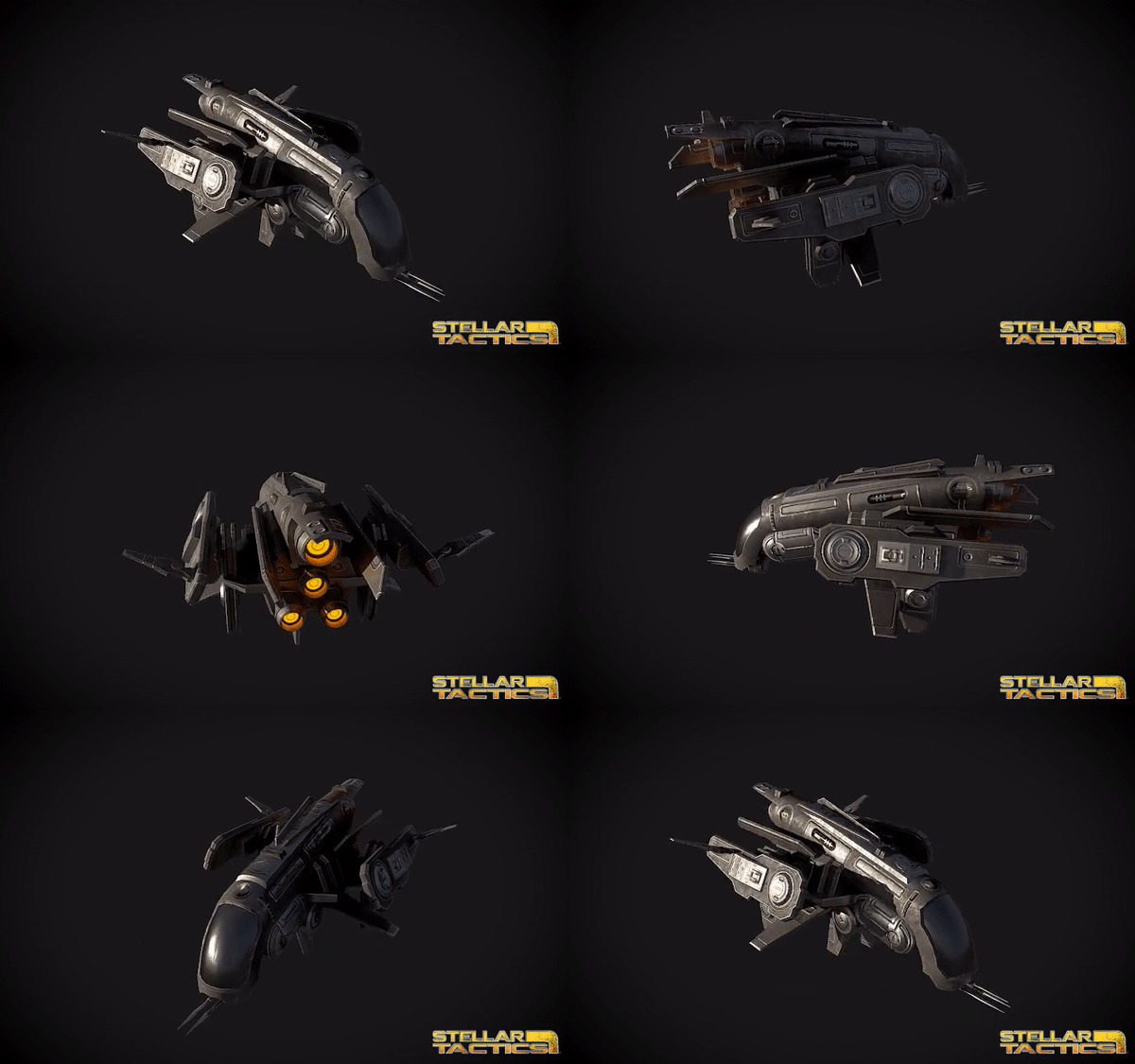
A few months back I worked on some new content for the game including putting together some new levels and working on some new ships to be added to the game in a future update.


The ships were built in Maya and textured in Substance painter and the aim was to keep them in the 3- 7,000 poly range with a little higher for some of the bigger cargo ships. Each of the ship has additional customisation with turret points and upgrades that can be added. I've been experimenting with 'Marmoset Toolbag' recently so put together some turntable renders and .Gifs of some of the models.


Stellar Tactics is currently in early access on Steam with frequent updates and active development,
for more information please check out the link below to the Steam store page.

Saturday, 4 June 2016

Monday, 30 May 2016

The Amityville horror begins 2#

Some work in progress shots of the interior foyer / stairway...


Sunday, 22 May 2016

Sunday, 22 December 2013

Speed Modelling / Product renders

Over the last few months I worked on a pretty wide variety of projects,one of these was modelling and rendering prototypes/products.I worked on everything from key-chains to colanders building models for 3d printing and interactive displays.The real challenge was to get them modelled and rendered within a deadline of just a few hours for promotional campaigns/websites,this is just a handful of the ones I worked on.


Weightlifting straps model and product render- http://crowngear.net


Prototype of a series of light-up photo booths - http://www.vegaseventbooth.com/


Model and Rendering of an electronic pulse massager-  http://www.trumedic.com/

Monday, 8 July 2013

Model / Concept render

I haven't had a lot of time to blog recently but thought I'd post some shots from a project I worked on a while back.This is an unused concept / model I built a while back for a music video based loosely on a fantasy art cover piece,it was originally going to be composited and rendered in After Fx.

Modelled in Maya 2012


Colin Kaszynski 2013.

Wednesday, 19 June 2013

Speed Model - CoffeeCups

Second speed model from this afternoon,very quick scene to build but shading / lighting was a little more complex (still very much a work in progress).

Maya speed modelling,about 40 mins.

Scene close up.

Thursday, 13 June 2013

Mech Concept render

Another couple of  renders I finished up showing a mech concept I played around with,the model was built fairly quickly as I actually pulled the jaw bone from a T-rex skeleton I had built and added hard edges to the teeth to make it more metal looking.

Mech concept design,Colin Kaszynski 2013.
Click images to enlarge.

Tuesday, 11 December 2012

3dsMax/Vray render

I pretty much finished my first proper 3dsmax/Vray scene,I could have spent ages adding in more details and objects but the project gave me a good overview of how to model,texture and light.I originally added some other pieces like curtains and blinds,pillows and other props but the scene just started to get cluttered.I have a good understanding of Max now but still think Maya is my preferred software simply because its what I learnt first and I find the tools a little more precise.

Colin Kaszynski 2012.3dsMax/Vray.

Click images to enlarge.

Monday, 3 December 2012

3dsMax / Vray Day 4

Small update on this scene,just adding more details like the table,cabinet and clock.Still need to add wall lights,cushions and curtains.Learning more of Max and Vray and getting used to the interface,I pretty much have all the basics now I need to finish the scene and maybe work on something a little more closer to my own style of work.


Sunday, 19 February 2012

Machine render

Extra detail render of the side of my turbine machine model,high poly speed model.First renders can be seen HERE .

Saturday, 18 February 2012

Animation Props

These are some low poly background props built last year for a health and safety animation for Sibelco industrial group.I worked on just the models themselves so these are just temporary shaders/quick renders.

Forklifts.Simple,smooth cartoon style.
Belt-conveyor machine prop.

Monday, 6 February 2012

Sci-fi concept render

Rendering out my sci-fi /spaceship corridor has been pretty slow but managed to get a fairly clean render done,still need to run a smoother render and clean up some elements for the final shot.

HighPoly concept speed model.Colin Kaszynski 2012.

Friday, 3 February 2012

Machine-model & render

Some renders of speed model I built earlier this week,the object was clean but high poly,inspired by a couple of images I saw of machinery modelling.Click and check out full size to see the detail better,I still have to experiment with rendering styles an ambient pass and shaders materials.
Speed model in Maya 2012.

Close-up of front section.

Wednesday, 18 January 2012

Jewellery - Model & Render

My last couple of post I was exploring different styles of art in 2D and 3D and looking at abstracting some shapes,it got me thinking about smaller sculptural shapes and for some reason I ended up with ring and necklace designs in my head.Spent an hour building some different parts and testing out shaders for a gem/diamond surface and then quickly modelled a ring design in Maya,fairly happy with the results and can see where to improve for my next attempt.

Smoky Quartz and silver ring speed model.Maya 2012.

Diamond variation,click to enlarge.Colin Kaszynski.

Sunday, 6 November 2011

Speed Model : Bedroom

After a week of UV mapping I needed a change so decided to do some speed modelling again and make a change from doing sci-fi / fantasy environments.This is a one hour model - render scene,done in Maya 2012.

Click to view in HD.

Renders a little rough round the edges and textures need work.

Saturday, 22 October 2011

Artlantis Studio Rendering - Review

Artlantis studio is another "realtime renderer",by now Ive learnt realtime means a nice preview..and you still have to hit render at some point!.My first time trying out the program I didn't give it much of a chance,the included sample files are fine but rendering them out was painfully slow.I decided to give it a second chance though and import a .obj of my own scene from Maya.
Once in the program you import a scene or model,there is sunlight setup allowing for location,time of day and cloud cover.A material bank containing some presets such as wood,floors etc and some simple objects you can use.The setup is fairly easy and the preview window will give you a pretty good idea how the scene is going to look.Render settings include radiosity and the main draw of the program is that it creates indoor and outdoor natural lighting well.

5 Min (1280x720) render with hard shadows and high radiosity 
Added soft shadows,7 Min render.Click images to enlarge.
The interface itself while being easy to navigate and understand i found a little off putting,a nicer layout would have drawn me in a lot quicker as when i actually rendered my scene the render time was pretty good.
There is a couple problems in the program,there are only 2 render options (high or low) for anti aliasing and 3 similar settings for radiosity and adding additional lights slow the render time massively.The program also crashed a few times when changing basic settings on a low poly scene.
I'm still undecided on what i think of Atlantis,its certainly worth trying again though.

Wednesday, 19 October 2011

Unity 3 lighting tests

Spent a hour or two playing around in Unity 3 engine,previously I found the final rendered game graphics to be a bit disappointing so I thought I would experiment with lighting options and see what I could come up with.I imported a couple of my Maya models into the engine to test indoor lighting and anti-aliasing effects.

Some realtime shadows,image effects applied to camera to soften jaggy edges
Forward lighting with some point lights to fake ambience

Saturday, 15 October 2011

Lamborghini Turnaround

Sunday, 9 October 2011

AutoDesk Showcase rendering

I must have  tried at least a dozen "real-time" render programs by now but forgot to actually look and see if Autodesk had one of there own,I stumbled over Showcase while looking at game engines and another rendering program called Marmoset on You Tube.Showcase is a hard program to judge,it has tons of features and presets,its got hdri lighting and a library of materials to play with but compared to some of the other software I tried it isn't particularly fun to use.It might be strange to describe it as not being fun but I think the best programs encourage you to play around,in the case of realtime renderers slapping textures onto objects they clearly don't belong to and looking at the results.Compared to Lumion the renders do come out more realistic and with a less like a game engine.The program is good though,there is huge amount of options and you can create turnarounds and movie's and even add animation but what stops me going back to it is that performance wise its below some of the other software I tried.On my laptop it ran very slow when I tried upping the details,if you have a good computer give it a go for sure but there's quicker realtime software.

I imported my train model and was pretty happy with realtime results
but beyond this level of detail my PC came to a standstill.

Rotating camera on this scene it looked fair,one thing I did notice is
that Showcase doesn't support .obj importing